Product · Platform

The workspace your shift runs on.

Triage queue, alert detail, threat intel, suppression rules, reports and the full audit log. One product, one record, every device your team uses.

Splunk
Sentinel
CrowdStrike
MISP
OTX
Slack
MS Teams
Jira
ServiceNow
Mobile
WedgeX · Workspace
Dashboard
Day's overview
Triage queue
Risk-sorted alerts
Verdicts
Escalate, close, verify
Threat intel
Feeds & IOC lookup
Suppression
Mute repeat noise
Reports
Weekly digest
The workspace

Take a look around.

Every screen sits on the same data, the same audit log and the same agent verdicts. Pick one to take a closer look.

Dashboard

The first screen of every shift.

KPIs, the awaiting-decision queue, connector health, alert trends and the live agent trace, all on one page. Updates roll in as the agent works, no refresh needed. The first place an analyst lands and the last place a lead checks before they sign off.
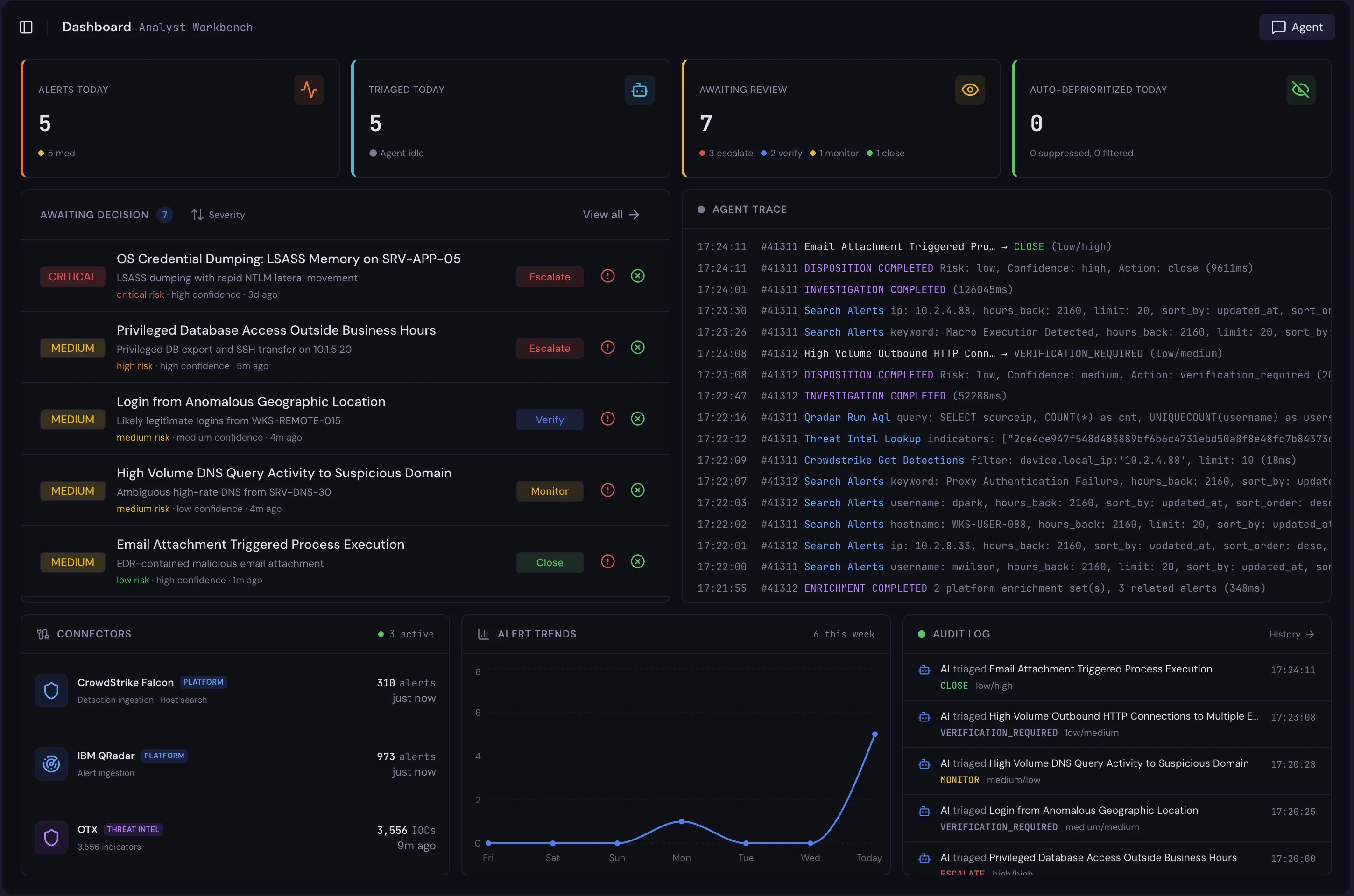
WedgeX Dashboard surface
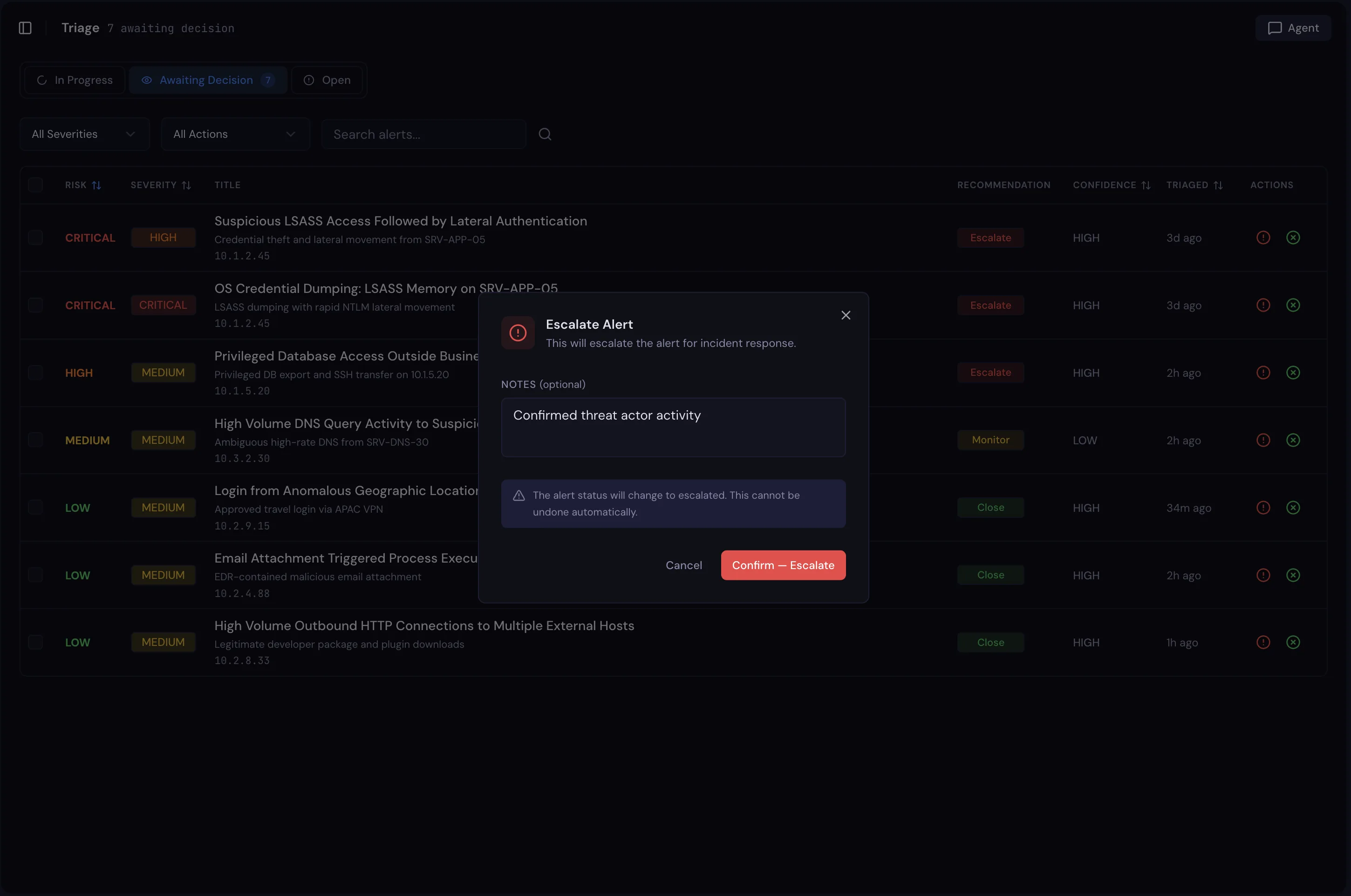
Triage queue

Risk-sorted. Verdict-ready.

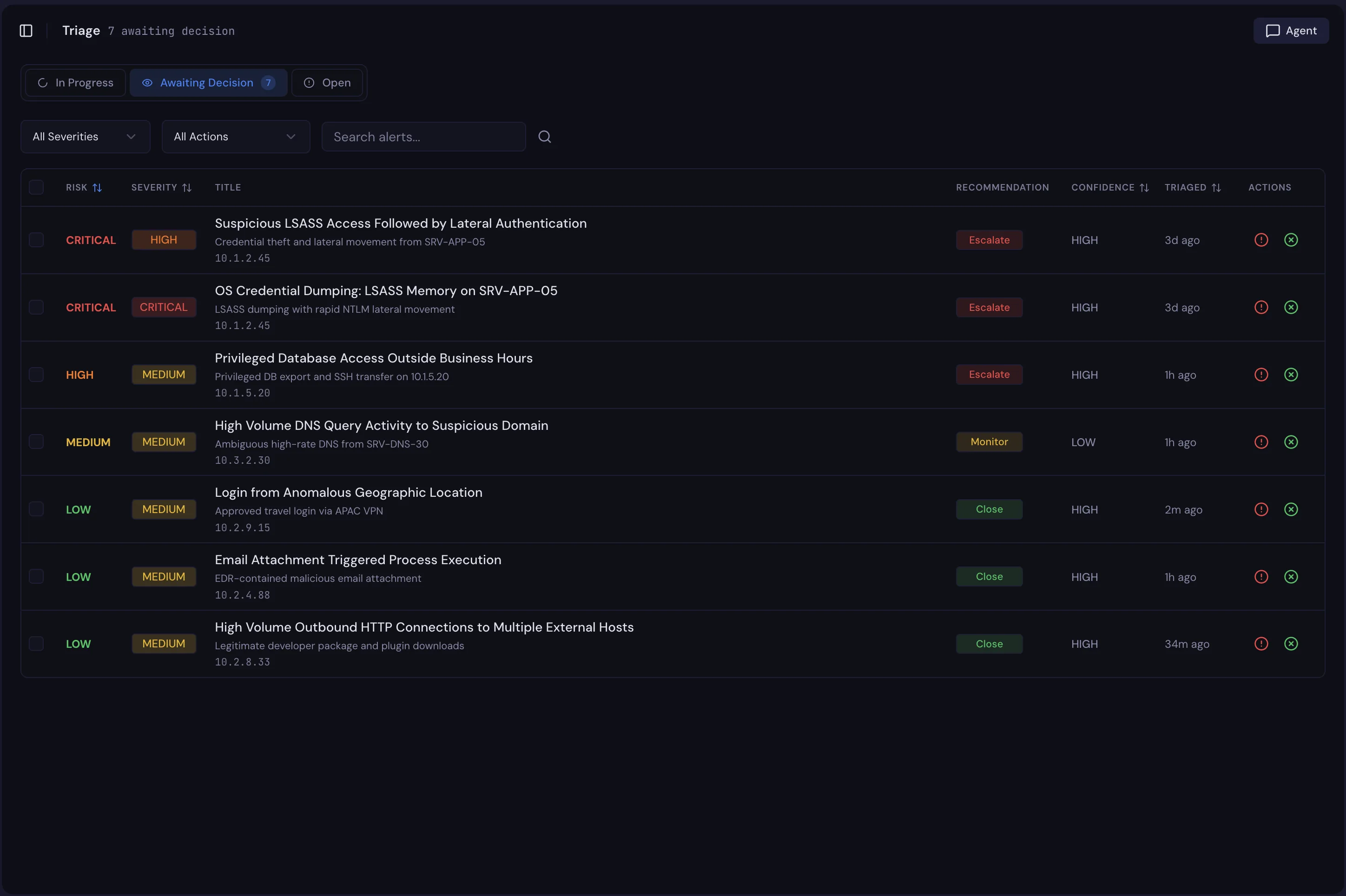
Every alert the agent has investigated, sorted by risk and grouped into In Progress, Awaiting Decision and Decided. One-click True Positive or False Positive on every row, with optional notes, bulk actions and a full append-only audit trail.

WedgeX Triage queue surface
Verdicts

Escalate, close, verify, in one screen.

Open any alert to see the agent's verdict, the cited evidence and the proposed response actions. Escalate, close, verify or override in a single click. Every decision and approved action lands on the same append-only audit trail.

WedgeX Verdicts surface
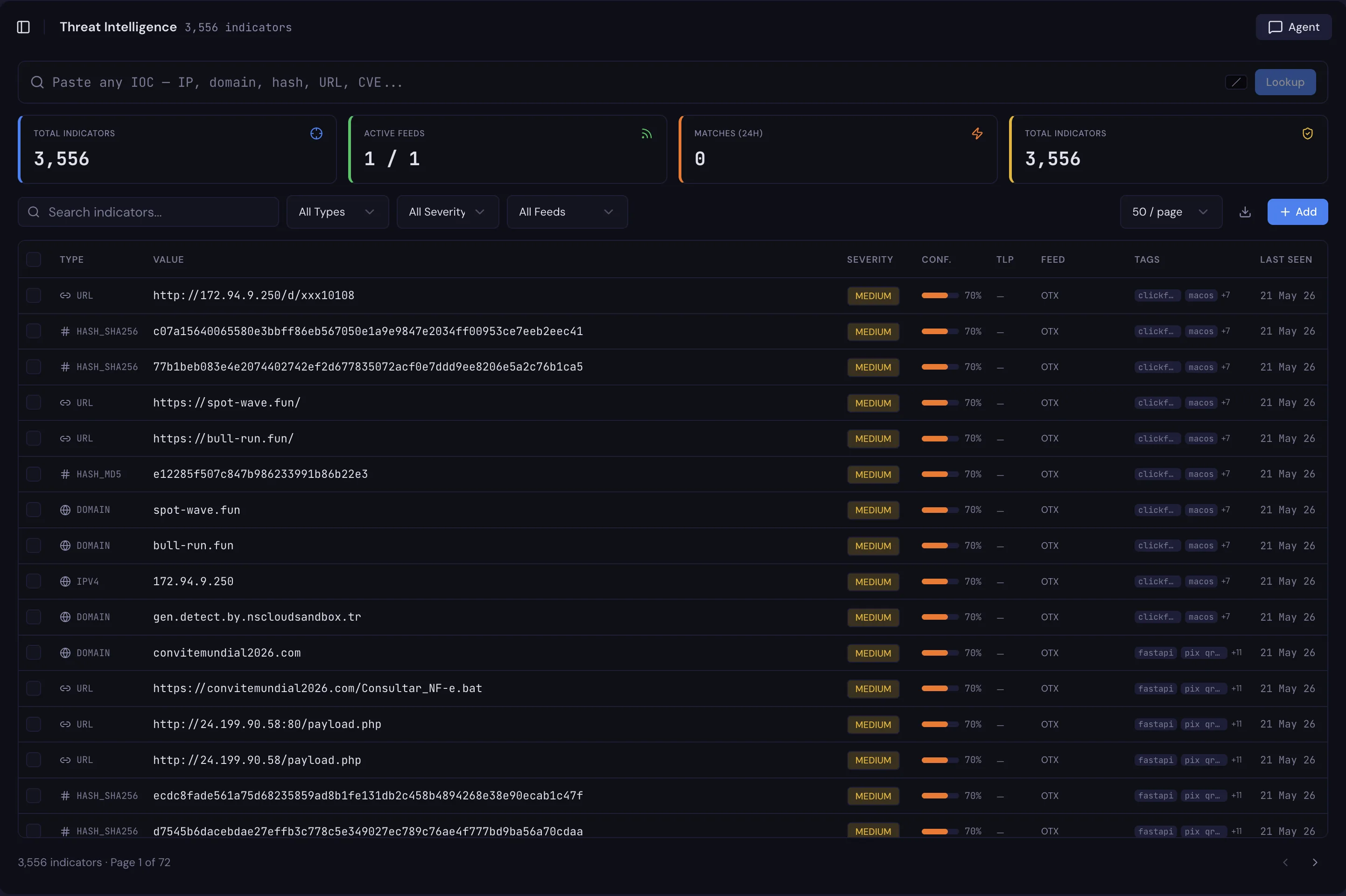
Threat intel

Your feeds, your indicators, one lookup.

Paste anything that looks like an IOC and the platform works out what it is, then checks it across every feed you've connected. AlienVault OTX, MISP, AbuseIPDB, your own BYO feeds and any indicators your team adds by hand, all answer the same lookup.

WedgeX Threat intel surface
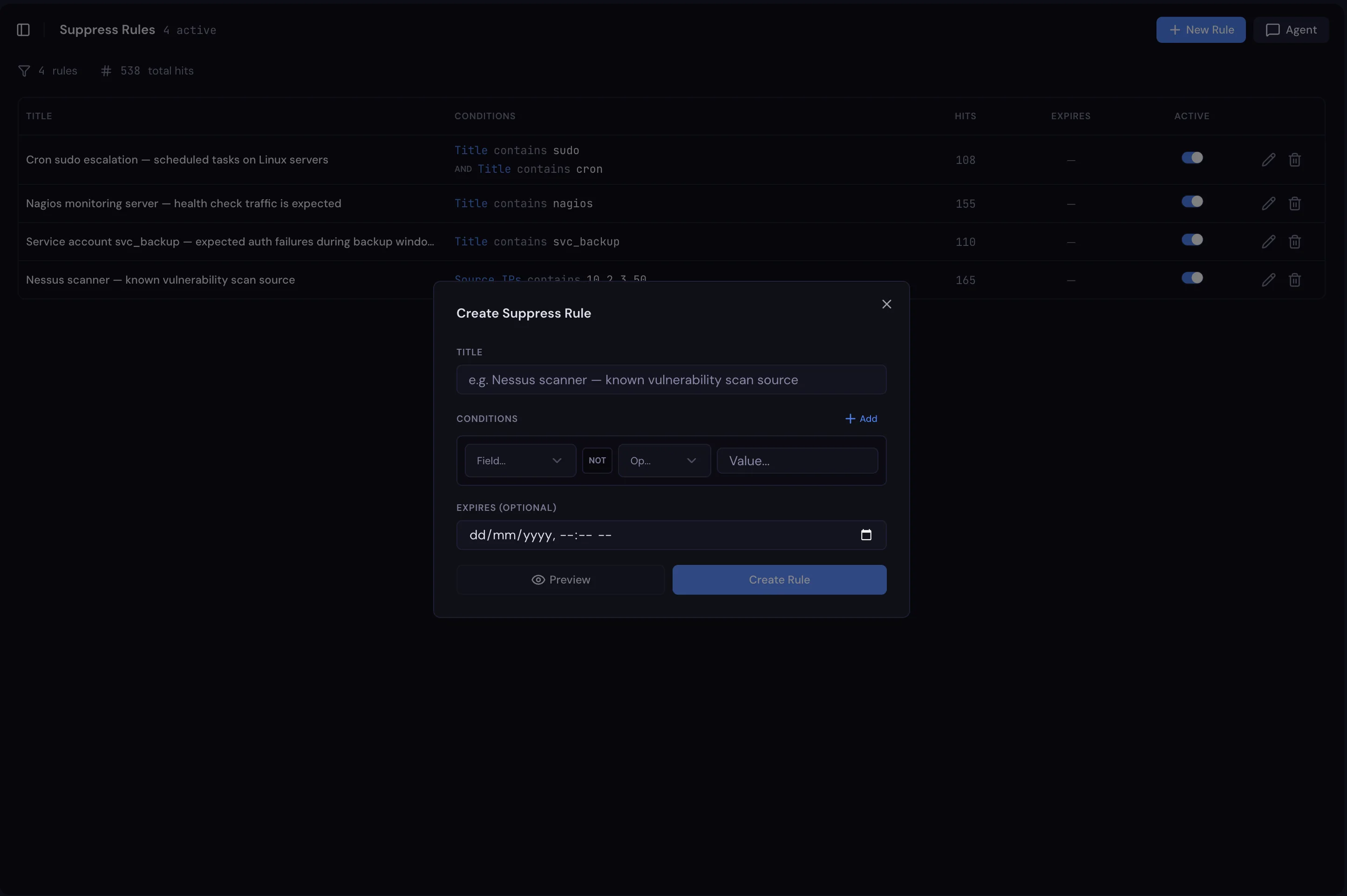
Suppression

Rules drafted from real alerts.

Field-by-field rule builder with ten-plus operators and a NOT toggle on every condition. Preview the exact alerts a rule would catch before you save it, then watch it run retroactively across the queue. Rules expire on the date you set.

WedgeX Suppression surface
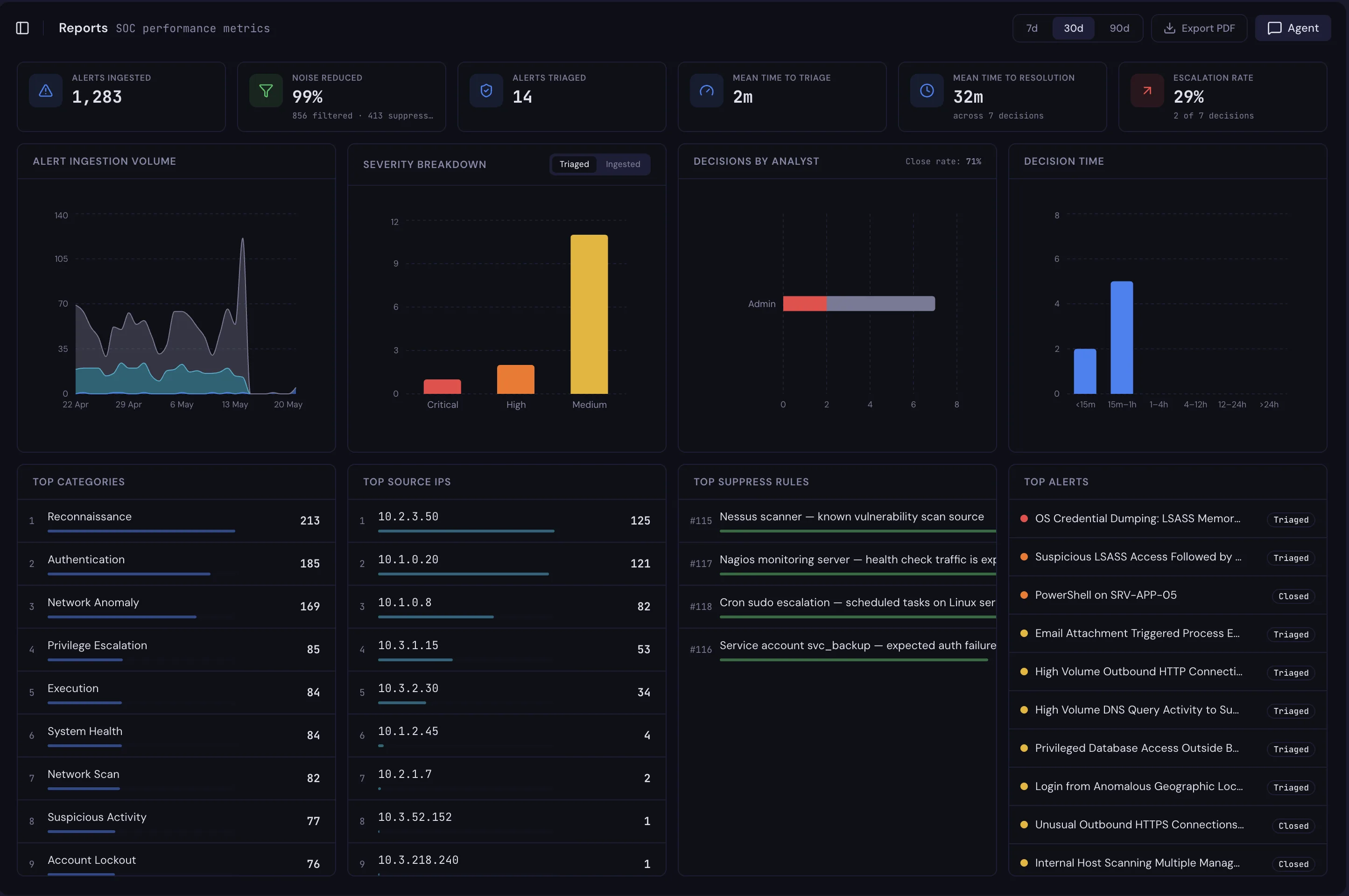
Reports

The week in one document.

Ingested versus triaged. Mean time to triage, mean time to resolve, noise reduction as a percentage. Top categories, top source IPs and the suppression rules pulling their weight. Export the lot to CSV or a polished PDF brief.

WedgeX Reports surface
Live operation

Built around what is actually happening, right now.

The workspace updates in real time as triages finish, decisions go in, and connectors poll. No refresh, no second window.

Audit log

Every step on the record.

Twenty-nine plus tracked actions. Every decision, every approved response, every configuration change, every triage the agent completed.

Audit logLive
  • 09:42:11agentTRIAGE_COMPLETEDsplunk-55320 · phishing · low risk
  • 09:42:08j.kellyALERT_CLOSEDsplunk-55320
  • 09:42:05agentTRIAGE_COMPLETEDsentinel-30184 · sign-in anomaly
  • 09:42:02r.taylorVERDICT_RECORDEDescalated · sentinel-30184
  • 09:41:59agentTRIAGE_COMPLETEDcrowdstrike-12044 · vpn brute force
  • 09:41:56a.patelACTION_APPROVEDcontain-ip 203.0.113.42
  • 09:41:53agentRULE_PROPOSEDsuppress edr-finance-tier
  • 09:41:50j.kellyALERT_CLOSEDsplunk-55318 · false positive
  • 09:41:47agentTRIAGE_COMPLETEDsplunk-55320 · phishing · low risk
  • 09:41:44j.kellyALERT_CLOSEDsplunk-55320
Throughput last 24h
284
Alerts triaged
32s
Mean time to triage
11m
Mean time to resolve
Connector health 5 active
  • QRadar SIEM
    polled 12s ago
  • CrowdStrike EDR
    polled 4s ago
  • AlienVault OTX
    synced 9m ago
  • AbuseIPDB
    polled 6m ago
  • Internal MISP
    synced 14m ago
Where the work goes

Lands where your team already lives.

Notifications and tickets head straight to the tools you already pay for. Nothing new to learn, nothing extra to log into.

  • Slack Notifications
  • Microsoft Teams Notifications
  • SMTP Notifications
  • Webhooks Notifications
  • Jira Ticketing
  • ServiceNow Ticketing
Slack / #soc-alerts 12:14
W
WedgeX Bot 12:14 · Critical · sentinel-30184

Cross-platform sign-in anomaly on alice@ from src 10.0.0.5.

W
WedgeX Bot 12:18

Triage complete. Verdict Escalate , risk High, confidence High.

Jira / SEC-1234
In Progress
Verify alice account, sign-in anomaly

Cross-platform sign-in anomaly flagged by WedgeX. Full investigation trace in linked alert.

Assignee jordan.smith Priority High Linked sentinel-30184
Tuned to you

Four settings. Your shape of normal.

Marketing-grade defaults out of the box, real-team configuration underneath. What you put in here is what the agent applies to every alert it touches.

Setting
Ingestion filters
What you set

Magnitude floors and source rules per connected platform

What changes

Low-value alerts drop out at ingestion, before they hit a queue. The agent only spends cycles on what crosses your bar.

Setting
Suppression rules
What you set

Field conditions in a visual builder, or drafted from a real alert

What changes

Repeat noise stops at the door. Rules can expire, toggle off, or be reviewed when the world changes.

Setting
Escalation paths
What you set

Who gets paged when, on which alert types, through which channels

What changes

Notifications and tickets land in the systems your team already lives in. No new inbox to learn.

Setting
Action scope
What you set

Which response actions the agent is allowed to propose, and to whom

What changes

Analyst still approves each one, but the agent only proposes inside the boundary you set.

Every device

Triage at your desk. Approve from your phone.

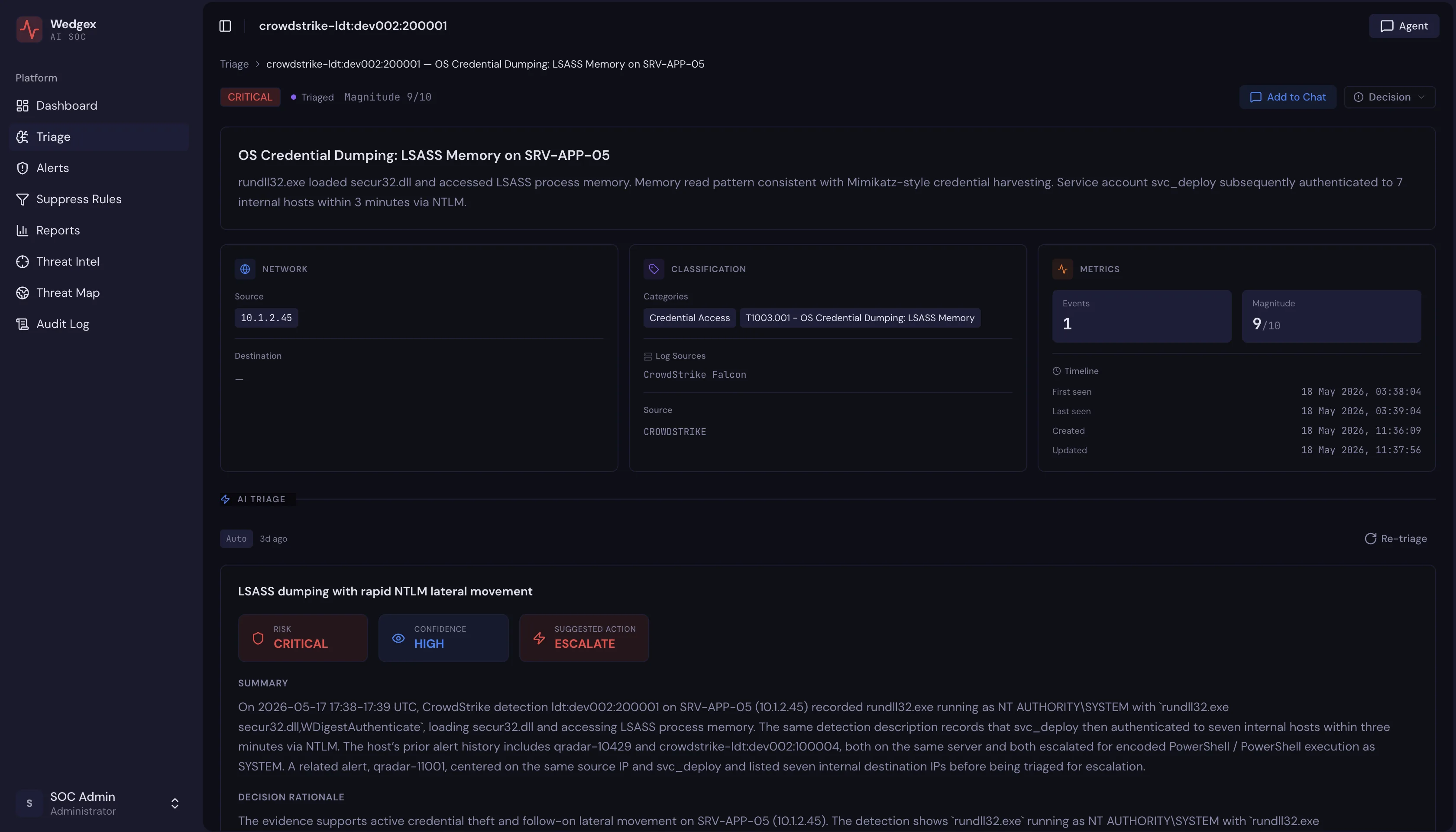
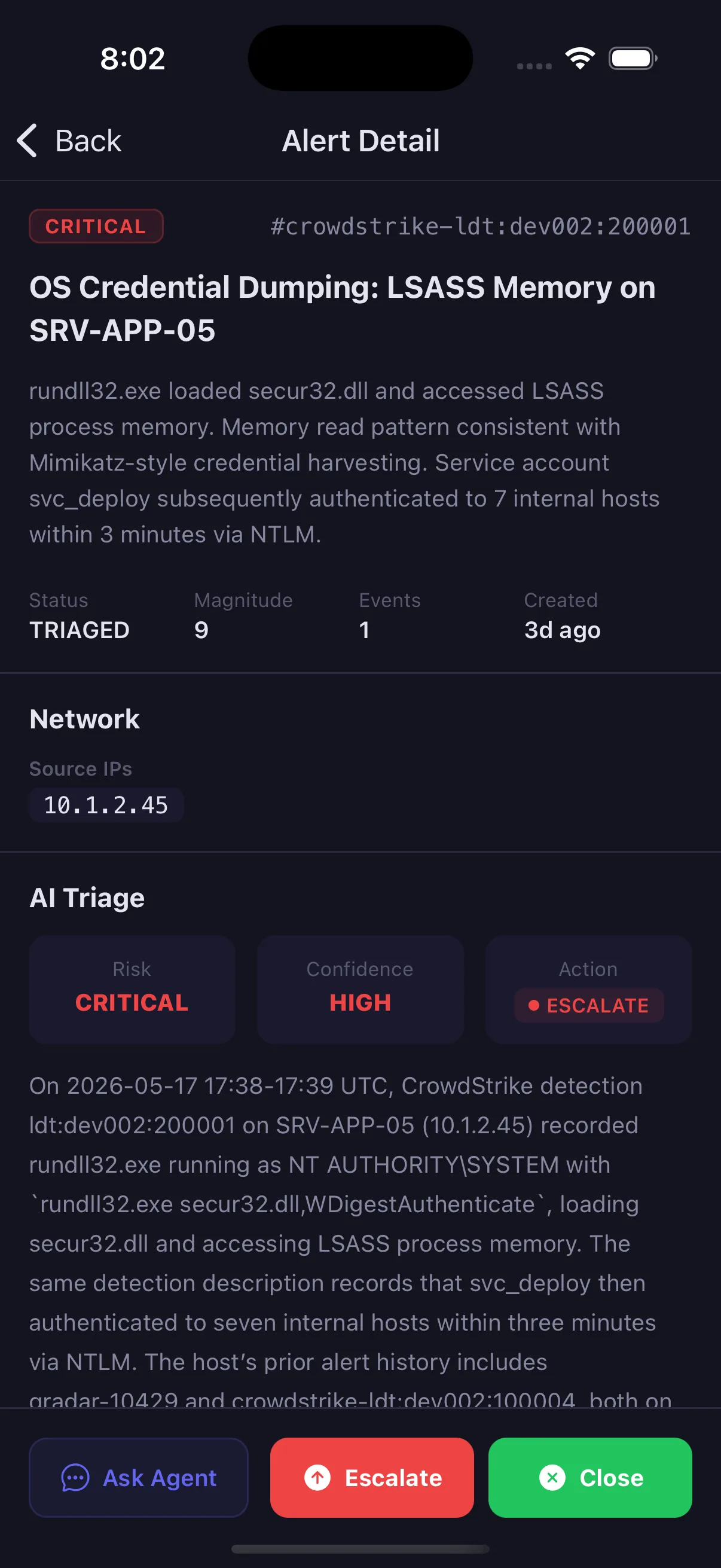
Same data, same audit log, one product. The mobile app exists for the calls that come in after hours, not as a second-rate read-only view.

  • Push notification, tap straight to the alert
  • Approve, reject or escalate from the phone
  • Decisions sync to the same audit log
WedgeX alert detail on desktop
WedgeX alert detail on mobile
What's in the box

Everything else, on one page.

The features that do not get their own section but are there from day one.

01

Workflow

  • Three-section triage queue
  • One-click True / False Positive
  • Bulk verdicts with notes
  • Alert detail with cited evidence
  • Proposed response actions
  • Inline approve and reject
  • Cmd+K copilot from any page
02

Data & intel

  • Multi-feed threat intel
  • IOC lookup with auto-type detection
  • CIDR and subdomain matching
  • Connector health monitoring
  • Two-tier cache for instant refresh
  • CSV and PDF export
  • 29+ tracked audit events
03

Trust & control

  • Three-role RBAC
  • JWT plus rotating refresh tokens
  • Append-only decision trail
  • Write-tool isolation from the LLM
  • Configurable retention per data class
  • On-prem or managed deployment
  • Australian data residency

See the workspace in your team's hands.

Thirty minutes with our team. We walk through the surfaces on a real alert and answer any question about how your shift would use it day to day. No slide deck.